
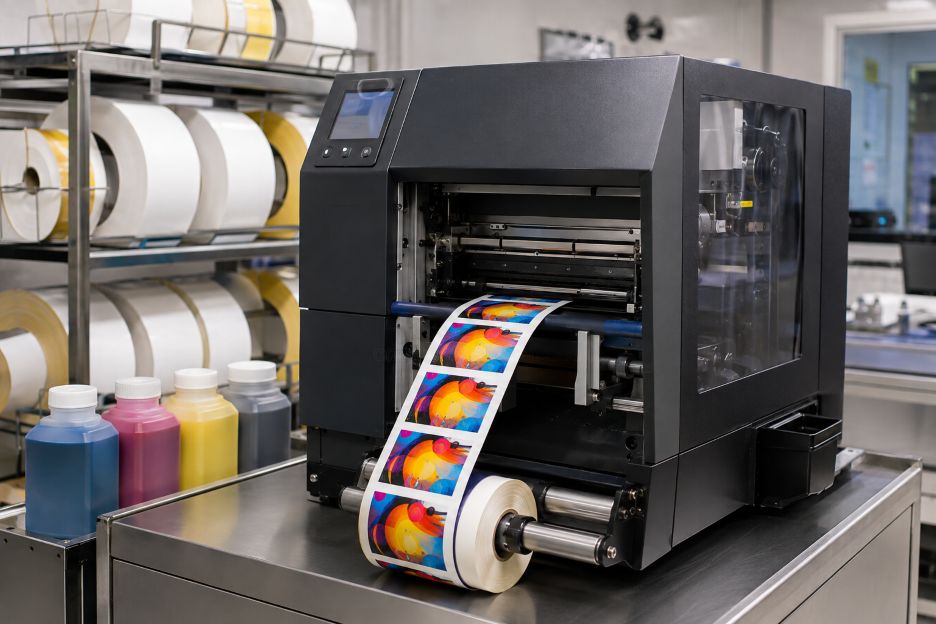
The Epson ColorWorks C8000 is a four-inch industrial inkjet printer built to produce full-color labels on demand in medium- and high-volume batch workflows. Epson America lists a maximum speed of 11.8 inches per second at 1,200 by 600 dpi. That combination positions the machine for operations that need changing graphics, barcodes, or product data without maintaining large inventories of preprinted labels.
The printer is one part of a wider production system. Buyers also need ink, suitable media, software, connectivity, and routine maintenance supplies. Suppliers of DuraFast C8000 labels offer die-cut and continuous options intended for the platform, but dimensions alone do not establish suitability. Surface coating, adhesive, liner, exposure conditions, and the printer’s black-ink configuration all affect the practical result.
The Core Printing Platform
At the center is Epson’s PrecisionCore Heat-Free printhead and UltraChrome DL pigment ink system. The manufacturer says the permanent printhead uses nozzle verification and maintenance functions to support consistent output. Its integrated auto cutter separates jobs or cuts continuous stock, while an internal rewinder collects the liner after labels are peeled. These features matter differently depending on whether labels are applied by hand, produced in batches, or transferred into another finishing step.
Output width reaches 4.25 inches, according to the Epson CW-C8000 Series Technical Reference Guide. The printer accepts roll or fanfold media and detects black marks, gaps, or transparent gaps. Evaluators should therefore map every current label size and sensing method before assuming that an existing stock can move directly from a thermal printer.
Ink Packs and Operating Continuity
The ink architecture uses separate cyan, magenta, yellow, and black packs with 1.9 liters of total installed capacity. Separate colors allow an operator to replace the depleted channel rather than a combined cartridge. Epson also states that ink is consumed during printhead maintenance and that every color must remain available for printing. Actual yield consequently depends on artwork coverage, settings, media, cleaning activity, and the mix of colors used.
Two printer versions are available, one using gloss black and another using matte black. This is a configuration choice, not a setting that can be changed for each job. Gloss black is aimed at glossy substrates, while matte black supports stronger black density on matte or plain paper. A purchasing review should pair representative artwork with the intended face stock and test both color appearance and barcode readability.
Compatible Label Stock
Media is the most variable part of the ecosystem. The Epson CW-C8000 Series User’s Guide describes settings for matte paper, synthetic media, textured paper, wristbands, and glossy paper or film. It also provides adjustments for media coating, print quality, drying, and vacuum platen behavior. These controls show why a nominally compatible roll may still require profiling and testing.
Application conditions narrow the choice further. Paper can suit dry indoor cartons, while synthetic film may be considered where moisture, abrasion, or chemicals are expected. Adhesive selection must account for the container material, temperature, curvature, and required service life. Epson reports BS 5609 certification for specified combinations of its pigment ink and particular approved media, so that claim should not be extended automatically to every third-party label stock.
Drivers, Languages, and Management Tools
Software support determines how easily the printer fits an existing workflow. Epson ColorWorks identifies compatibility with Windows, macOS, Linux, major middleware, SAP, and ZPL II, alongside its native ESC/Label language. ZPL II can ease migration from established thermal-label environments, while ESC/Label gives developers access to Epson-specific color and control functions.
The driver handles media definitions, color correction, layout, and print-quality choices. EpsonNet Config supports network setup, and Epson Cloud Solution PORT can report printer status, ink consumption, and operating history through an internet-connected browser. Optional Wi-Fi expands placement choices, although wired Ethernet may remain easier to govern in production networks. Integration testing should include variable data, job recovery, permissions, and the exact label application used by staff. For Windows-based deployments, reviewing relevant Windows 11 Pro security features can also help teams consider authentication, threat detection, and workstation protection as parts of the wider printing environment.
What an Evaluation Should Cover
A useful trial goes beyond inspecting a sample image. Teams can run their smallest and largest formats, realistic batch lengths, representative barcodes, and difficult brand colors. They can also record changeover time, waste, ink use, drying behavior, cutter performance, and operator interventions. Staff training deserves attention as well, since loading media, defining stock, clearing errors, and checking nozzles become part of daily production. A pilot across several shifts can reveal whether documented procedures are clear and repeatable. The resulting evidence helps separate printer capability from media, artwork, or workflow problems.
The C8000 ecosystem ultimately combines a high-speed color engine with consumables, coated stocks, drivers, command languages, and monitoring tools. Its relevance depends on how those parts align with an organization’s label volume, durability needs, software environment, and support practices. Evaluating the system as a connected workflow, rather than as isolated hardware, gives decision-makers a clearer basis for planning without predetermining the outcome.